Playing Card Back Designer App, Vintage Patterns, Custom Colors & Antique Effects, Digital Download by CatandCherry
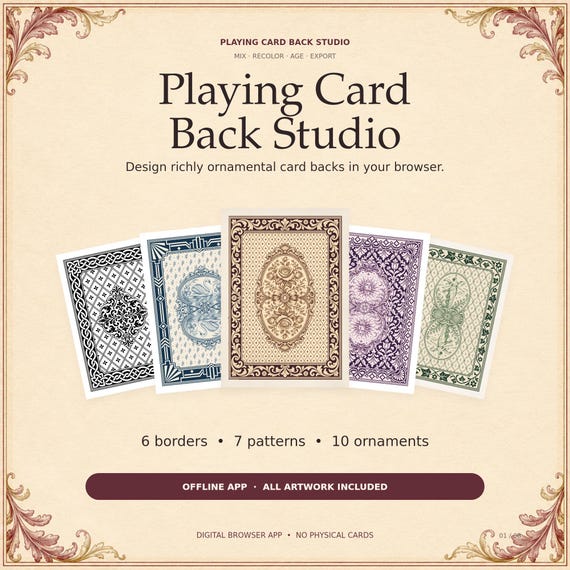
Create beautifully detailed playing card backs with Playing Card Back Studio, an easy-to-use browser app filled with ornamental borders, decorative patterns, and engraved medallions.
Mix your favorite elements, experiment with colors, add an antique finish, and download your finished design as a PNG image.
WHAT’S INCLUDED
• Complete downloadable browser app
• 6 decorative borders
• 7 background patterns
• 10 central ornaments
• 420 base layer combinations
• All artwork included inside the app
• Simple getting-started instructions
MAKE EACH DESIGN YOUR OWN
Choose from floral damask, delicate laurel sprigs, lace-inspired curves, petite diamonds, and other decorative backgrounds. Pair them with classical figures, swan cameos, celestial medallions, roses, or traditional ornamental motifs.
CUSTOM COLOR CONTROLS
Start in black and white, then choose your own colors for dark, middle, and light tones. A separate three-color gradient map lets you recolor the background pattern independently from the border and ornament.
ADD VINTAGE CHARACTER
Adjust the antique finish from subtle aging to deep amber patina, with faded ink, paper grain, and darker edges. The effect covers the entire card, including its outer margins.
MORE CREATIVE CONTROL
• Invert the border, pattern, and ornament separately
• Adjust the ornament size or hide it
• Shuffle the layers to discover new combinations
• Export PNGs at 1060 × 1484 or 750 × 1050 pixels
HOW TO USE
1. Download and extract the ZIP file.
2. Open Playing_Card_Back_Studio.html in your browser.
3. Choose your layers, colors, and effects.
4. Click Download PNG to save your finished card back.
Designed for use on a desktop or laptop with a modern web browser. Once downloaded, the app works offline. No installation, account, or subscription is required.
This is a digital software download. No physical cards will be shipped.
https://www.etsy.com/listing/4614270275/playing-card-back-designer-app-vintage?ref=rss&utm_source=dlvr.it&utm_medium=blogger


Comments
Post a Comment